solution ③

AI Workflow Automation

Connect a repeated task across your systems, with people approving the result.
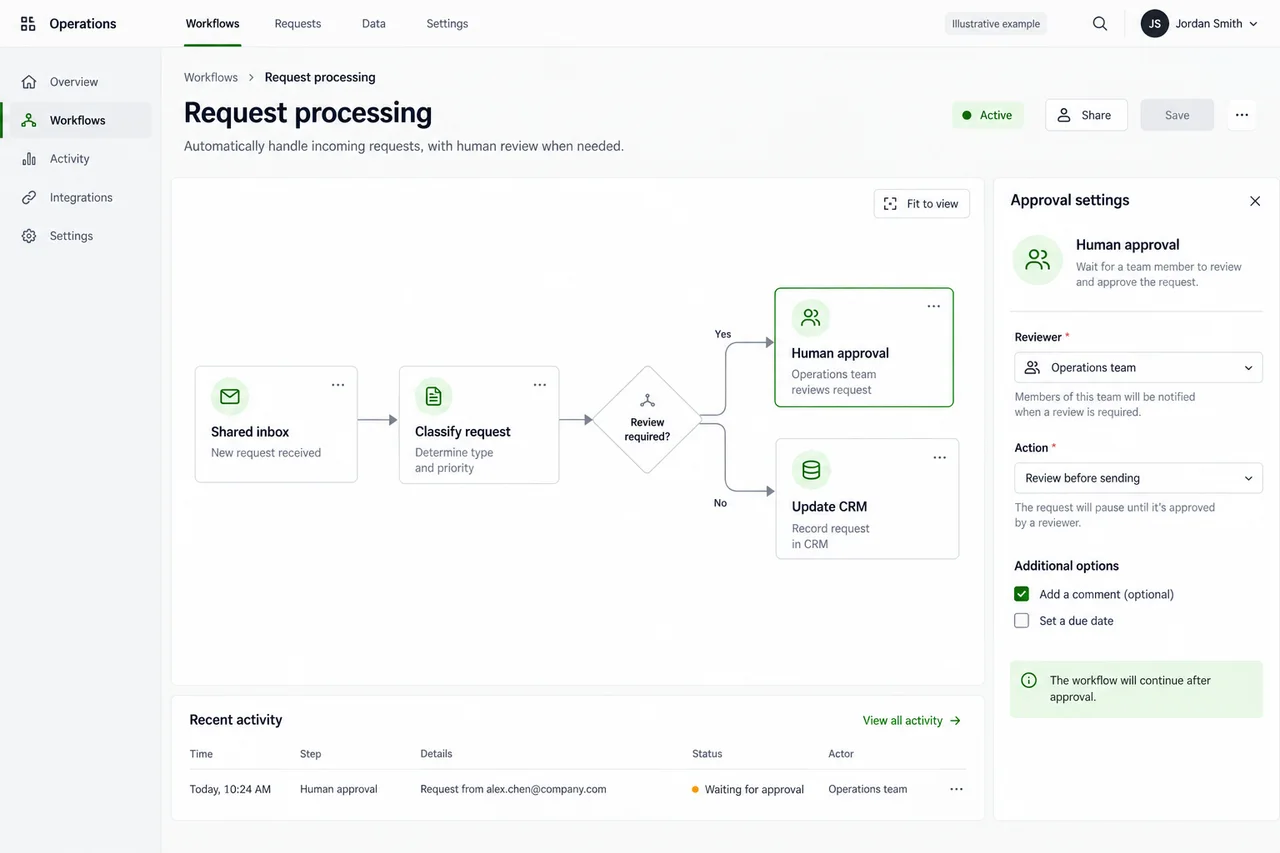
Example workflow editor connecting an inbox, request classification, human approval and a CRM update.
Illustrative application concept

Explore an example

Open the illustrative example

Canned replay · synthetic or public data

Illustrative data

Synthetic shared inbox, outside the property system. Every sender, property and message is invented. 8 messages, by email and SMS.

  1. smsTenant at SYN-108, after hours

    Hi, one of the kitchen cupboard doors has come off its top hinge and won't close. Can someone take a look?

    Sorted as
    Repair request
    Action
    Drafted for approval
    Why
    A repair request that names the property and the fault. The draft is a work order for a contractor, and a property manager approves it and arranges access.

    Draft, waiting for approval

    Work order for SYN-108: a kitchen cupboard door has come off its top hinge and won't close. Please rehang it, and tell us when you can attend so we can arrange access with the tenant.

  2. smsTenant at SYN-117

    Is the routine inspection still on for Tuesday morning? I'll be at work.

    Sorted as
    Inspection question
    Action
    Drafted for approval
    Why
    A question about a booked inspection. The automation can't see the inspection calendar, so it drafts a task for a property manager to check the booking and reply.

    Draft, waiting for approval

    Task for SYN-117: the tenant asks whether Tuesday morning's routine inspection is still on, and says they'll be at work. Check the booking and reply to the tenant.

  3. emailOwner of SYN-120, [email protected]

    Repaint before the next lease

    The lease at SYN-120 ends in February. Before it's re-let, could you get a couple of quotes to repaint the kitchen and hallway? I'd like to see them before anything is booked.

    Sorted as
    Owner instruction
    Action
    Drafted for approval
    Why
    A clear instruction from the owner. The update confirms the next step, and a property manager requests the quotes.

    Draft, waiting for approval

    Thanks. We'll ask two painters to quote for the kitchen and hallway at SYN-120 and send you both quotes. Nothing will be booked until you choose one.

  4. emailSynthetic Plumbing, [email protected]

    Invoice for the SYN-102 gutter clean

    Please find our invoice attached for the gutter clean at SYN-102, finished on Monday.

    Sorted as
    Supplier invoice
    Action
    Filed, with no reply
    Why
    An invoice for a finished job. It's filed for the accounts team, who enter it in the property system. No reply is needed.
  5. smsTenant at SYN-131, after hours

    Hi it's about the back fence again. The owner said last time you'd sort it out. Can you just go ahead?

    Sorted as
    Unclear request
    Action
    Escalated to a property manager, with no draft
    Why
    Ambiguous: it asks for work to go ahead, but doesn't say what's wrong with the fence, and relies on an earlier promise that isn't in the inbox. A property manager decides, so no draft is written.
  6. emailSynthetic Electrical, [email protected]

    Keys for SYN-126 on Thursday

    We're booked to replace the rangehood light at SYN-126 on Thursday at 9am. Can we collect the keys from your office first?

    Sorted as
    Contractor access
    Action
    Drafted for approval
    Why
    A contractor asking for keys for a booked job. The draft confirms the pickup, and a property manager checks the booking before approving it.

    Draft, waiting for approval

    Hi, the keys for SYN-126 can be collected from our office before the job on Thursday. Please sign them out when you collect them.

  7. emailOwner portal notices, [email protected]

    Scheduled maintenance on Sunday night

    The synthetic owner portal will be unavailable from 11pm on Sunday to 1am on Monday for scheduled maintenance. No action is needed.

    Sorted as
    System notice
    Action
    Filed, with no reply
    Why
    An automated notice that asks for no action. It's filed, with no reply.
  8. emailTenants at SYN-140, [email protected]

    Renewing our lease

    Our lease at SYN-140 ends in March. We'd like to stay for another year if the owner agrees. What do we need to do?

    Sorted as
    Lease renewal
    Action
    Drafted for approval
    Why
    A clear request to renew. The draft asks the owner, because the owner decides; a property manager replies to the tenants once the owner has answered.

    Draft, waiting for approval

    Owner update for SYN-140: the tenants have asked to renew their lease for another year when it ends in March. Please let us know whether you'd like to offer a renewal, and we'll reply to them.

Approval queue

5 drafts wait for a property manager. Nothing is sent until a person approves it.

  • waiting Draft to a contractor: Repair request
  • waiting Draft to a property manager: Inspection question
  • waiting Draft to the owner of SYN-120: Owner instruction
  • waiting Draft to Synthetic Electrical: Contractor access
  • waiting Draft to the owner of SYN-140: Lease renewal

Escalated to a property manager, with no draft: Tenant at SYN-131, after hours.

Filed, with no reply: Synthetic Plumbing, [email protected]; Owner portal notices, [email protected].

Decision buttons shown for illustration: Approve and send, Edit, Reject.

Shown for illustration: in this replay, nothing is sent.

Trace log · illustrative timings

  1. ReadRead the new mail in the shared mailbox and the after-hours SMS line, read-only220 ms
  2. SortGave each message a category, an action and the reason for both1,340 ms
  3. CheckFound the message with no clear request and sent it to a property manager, with no draft280 ms
  4. DraftDrafted a work order, a task, two owner updates and a reply to a contractor2,910 ms
  5. HoldHeld every draft for a property manager's approval, so nothing was sent60 ms
  6. LogRecorded each step's input, output and time in this trace15 ms
A synthetic shared inbox, sorted and drafted for approval.

The job

AI workflow automation for one repeated business process. It reads incoming work, prepares a draft and routes exceptions; a person approves anything sent or changed.

What you receive

A scoped workflow, approval queue, trace log and operating instructions. Its test on your past examples shows drafts, routing decisions and exceptions before you decide to launch.

Who it's for

Packages

One job, drafts for approval

For
An operations lead with one repetitive back-office job that crosses two or three systems, such as a shared inbox, an SMS line and your practice or property system.
Scope
One workflow across up to 2–3 systems. The automation sorts, summarises, drafts and routes, and an approval gate holds every outbound or record-changing action until a person approves it.
Included
  • A map of the workflow as it runs today
  • The autonomy level, agreed in writing
  • An approval gate on every outbound or record-changing action
  • A test on 50–100 of your past cases, showing mis-routes and bad drafts
  • A trace log of every step, and a kill switch
  • A permission review, with least-privilege access, read-only wherever the system's own access is read-only
Every package includes
  • A test on your own examples, with thresholds agreed before testing and every failure shown, or, for AI Switch-On, the hours saved, measured against a baseline taken before anything changes.
  • Where the work has a test set, a re-run of it when the AI model changes or may have changed: by us on a system we build or run, and by your team, with the kit we hand over, after an evaluation.
  • A one-page data note: where your data sits, where the model runs, retention and deletion.
  • A runbook and a handover.
  • The delivery choice that fits the package, named in its region note.
  • Your time commitment, stated in hours and weeks.
Your time
A process owner for about 2 hours a week, historical examples of the job, and a least-privilege service account.
Timeline
5–6 weeks, from the workflow map to go-live after the test on past cases.
Out of scope
  • Autonomous customer-facing actions: a person approves everything that goes out
  • Voice calls or voice bots
  • Jobs that live inside one system whose own tools cover them, such as XeroForce (when generally available), Karbon AI, Copilot Studio or PropertyMe Automation Studio. We'll tell you to use those.
Go/no-go gate
Before go-live, you see how the automation handled 50–100 of your past cases, with every mis-route and bad draft, and you decide whether it goes live.
Region note
The automation, and the model it calls, run in the cloud region you choose, in your own Microsoft or AWS account, or in an Australian region if we manage it for you. A draft that lands in a system you already license is stored where that vendor stores your other records, and the data note records what the vendor publishes about that location, or that it publishes none. If the model you want isn't offered in your chosen region, you hear that before you decide. Our team reaches the automation remotely from Sydney, under the data-transfer terms in your contract.

Your data stays in your region.

This page describes a packaged offer, not a delivered engagement.

  • On request Shared Inbox & After-Hours Triage: Sorts, summarises and routes the mail and after-hours SMS that land outside PropertyMe, and a property manager actions each item in PropertyMe.
  • Australia On request ATO Letter Sorter: Reads each ATO letter for the action and due date, matches it to the right job and drafts the reply for a person to approve, for practices without an ATO document feed.
  • On request Shift-Handover & Field-Report: Drafts the shift record from the several systems a handover pulls from, for a supervisor to approve.
  • On request Fault-to-Work-Order: Turns a fault note, failed inspection item or maintenance alert from one system into a draft maintenance request in another, for a planner to approve.
  • On request RFQ & Quote Prep: Drafts quote lines and open questions from requests with drawings and specifications your ERP's built-in AI doesn't read, for an estimator to check, complete and send.

The program

Supervised multi-step automation

Several connected jobs under one set of controls. Offered only alongside an evaluation by a party other than Techsider.

12 weeks

  • A register of every automation, with its owner and autonomy level
  • Its own identity and least-privilege access for each automation
  • A review of every tool and permission each automation can use
  • Monitoring and an incident runbook

How we test it

Acceptance test (not independent)

Every automation is tested on 50–100 of your own past cases before go-live, with success measured in your own units.

  • Every mis-route and bad draft, each one shown
  • The items it passed to a person because they were ambiguous
  • Time saved in your own units, such as hours a week, against a baseline taken before the build, such as an Admin Hours Audit's
  • A re-test on the same cases when the AI model changes

Read the evaluation method

Where it runs

  1. (a) In your own Microsoft or AWS account

    Runs in your own Microsoft or AWS account, in the cloud region you choose. Our team reaches it remotely from Sydney, under the data-transfer terms in your contract.

  2. (b) Managed for you in an Australian region

    We run it for you in an Australian region, with an exit pack of code, data, configuration and runbook. If you're outside Australia, your data is transferred to Australia under the terms in your contract.

The automation runs in your own Microsoft or AWS account, in the cloud region you choose, or in an Australian region we manage. It reaches each system through that system's own access, and where that access is read-only, the automation stays read-only.

The region note

  • Where inference actually runs, which can differ from where the platform is hosted.
  • The provider's retention, abuse-monitoring and human-review settings.
  • What happens when the newest model isn't available in your chosen region.
  • For a platform you already license: the vendor's published processing location, or "not published", with its source and an as-at date, re-checked quarterly.

What we don't do

Use your platform's AI first

If the job lives inside one system, use that system's own tools first: Copilot Studio, Karbon AI, PropertyMe Automation Studio, or XeroForce (when generally available). We build only for jobs that cross systems no single vendor's tools reach.

  • We don't build autonomous actions. Nothing is sent, changed or decided without a person's approval.
  • We don't build voice bots or customer-facing chat.
  • We don't rebuild a job your platform's own tools already handle.

Questions

Will it send anything on its own?
No. Every outbound message and every change to a record waits at an approval gate until a person approves it. The autonomy level is agreed in writing before the build, and a kill switch stops the automation at any time.
Our platform is adding AI. Won't it do this soon?
It might, and if it does, use it. If a job lives inside one system whose own tools cover it, we'll say so at the Fit Call and point you to them. This package is for jobs that cross systems no single vendor's tools reach, such as a shared inbox outside your property system.
How do we know it works before it goes live?
It's tested on 50–100 of your own past cases before go-live, and you see every mis-route and bad draft. Success is measured in your own units, such as hours a week, against a baseline taken before the build.
Have you built this for anyone else?
No. Techsider has no clients yet, and this page describes a packaged offer, not a delivered engagement. That's why the test on your own past cases comes before go-live, and you decide whether it goes live.
